I track the number of LinkedIn users with Sales Enablement in their current job title. 7-Apr-2023, LinkedIn had 18k users like that globally. It includes many employees of Sales Enablement SaaS software vendors.
This blog turned 15 years old in 2024!
Frequent edits on my entire market overview of 832 vendors:
From my own research, the Sales Enablement software market will reach $11.06Bn USD in annual revenue in 2024. The following is how I see the main players & their market share (often wrong or outdated so please let me know about suggested changes here).
The first ones are not in order of revenue:
I track the number of LinkedIn users with Sales Enablement in their current job title.
The use of the term Sales Enablement in job titles on LinkedIn obviously includes many employees of Sales Enablement SaaS software vendors, but nevertheless, that is 4-5x since August 2015 when I started tracking it. [My blog turns 15 years old in 2024.]
Paul KrajewskiLinkedIn twitter @SalesEnablement German citizen. Permanent Resident in Canada & Australia. Spent 2007-’09 at Nortel Networks in Toronto in Global Marketing looking after the implementation of the BizSphere Sales Enablement application for Nortel Networks’ 4000 sales people worldwide. After working as Head of Training & Senior Sales Enablement Consultant at BizSphere, Sr. Product Manager at Pivotal Labs from Jan-’15 to Jul-’19.
A look at the Sales Enablement companies in Canada. My worldwide list is here or as a spreadsheet here.
This list for Canada was last updated on 25-Apr-2024:
360insights 360insights.com@360insights Channel Success Platform empowers brands to create, measure, & manage their channel incentives programs. 360insights (Canada) Ltd., Canada
Scrimmage wescrimmage.com@wescrimmagemobile learning platforms & sales enablement software to help reinforce training, improve speed to competency, & enhance sales productivity. Minneapolis, MN, USA-based mobile learning company Scrimmage has been acquired by Canadian software company ACTO actoapp.com@actoApp the companies announced 11-SEP-2020. “Disrupting Education & Enablement For The Life Sciences” / Omni-channel Education ecosystem for education in healthcare & life sciences. ACTO Technologies Inc. Toronto, ON, Canada. 30-Oct-2020: ACTO acquired CoHealth. With joined forces, we are empowering life sciences companies to deliver trusted health content to patients & caregivers, as we drive education outcomes across the care continuum.CoHealthcohealthapp.com@cohealthapp CoHealth (Formerly Dash MD DashMD) We provide patients with the tools and resources they need to manage & coordinate care & recovery. 12-Sep-2018: Dash MD rebrands to CoHealth. Toronto, Ontario, Canada
Ada Inc / Ada Support former www.ada.support/@adasupport now ada.cx@ada_cxChatbot platform that makes artificial intelligence accessible to non-technical support teams. It operates through both web & mobile machine learning engine that reduces support volume, empowers customers to find answers on their own, & automatically learns how to better serve customers in the future. $2M in estimated revenue annually & competes with Pandorabots, Dexter, & Passage AI. Toronto, ON, Canada
19-Apr-2021, DANVERS, Mass., USA, Demand Science DemandScience demandscience.com@DemandScience(Buyer Intelligence Platform / B2B Sales Enablement & Market Intelligence Solutions) completed the acquisition of Leadiro leadiro.com@leadiro B2B sales enablement, sales intelligence & data enrichment platform with 60M+ verified records. Moreover, Demand Science achieved 50% CAGR since 2014, & is on track to exceed $100M in revenue in 2021. UK-based Leadiro experienced more than 100% year-over-year revenue and EBITDA growth in 2020. Q1 was a record revenue quarter with approximately 150% year-over-year revenue growth. Demand Science is a global buyer intelligence platform that accelerates demand generation for the world’s largest software, technology & B2B companies. It delivers data & prioritized buyer insights that align sales & marketing professionals with more qualified audiences through its PureB2B, Klarity, Internal Results, Leadiro, Tidings, & BIOMES brands. Interestingly on 3-Feb-2022 klarity.com started to redirect to leadiro.com. 20-Jul-2021: Airborne App Airborneapp airborneapp.io@Airborneapp_io sales engagement & enablement software platform (Toronto, ON, Canada) acquired by Demand Science. 8-Feb-2021, global buyer intelligence platform @DemandScience acquired Tidings tidings.com@TidingsCo on-demand automated newsletter creation SaaS platform, to expand its sales enablement (klarity.com which used to be prospectone.com) & intelligence solution suite.
Allocadia allocadia.com@allocadia marketing performance management: Planning, budgeting, & analysis software built for revenue-driven marketing teams. Every marketing organization wants to better understand investments & returns and measure how they impact the business (how marketing drives revenue). Typical organizations start with managing their marketing budgets, then they align to corporate objectives & plans, set targets, track actuals, and eventually measure & optimize their return on investment. By connecting to your finance, corporate budgets, CRM, resource management, marketing automation, & social media systems Allocadia gives you the most complete view of your marketing performance. Vancouver, BC
Amacus see Innovative Information Inc.
Amity getamity.com@GetAmity (Seems on zombie mode since 2019 & website offline or down since 11-Jan-2022). Customer Success software. Mitigate risk early. SmartPlaybooks enables your team to provide the right action at the right time.Improve Conversions: Understand what success looks like to your customers and how your product can help them get there. Drive Upsells: Understand your customer’s motivation for the upsell & be perfectly positioned to expand it. Toronto, ON, Canada
April Dunford aprildunford.com@aprildunford Toronto-based author & speaker with a deep understanding of Sales Enablement, B2B marketing & Positioning. See aprildunford.com/blog. So what is positioning? Her book, Obviously Awesome, shows you how to find your product’s “secret sauce”—& then sell that sauce to those who crave it. Having spent years as a startup executive (with 16 product launches under her belt) & a consultant (who’s worked on dozens more), she speaks with authority about breaking through the noise of a crowded market.
RAD AI radintel.aiRADAI.eth@Radintelai formerly AtomicReach / Atomic Reach: AI-powered content optimization platform, the technology audits, analyzes, & regenerates your content, starting with the optimization of evergreen content then bleeding into new content creation. The company was acquired by Rad Intelligence, as of 8/01/2021. Rad Intelligence is RAD AI. Atomic Reach atomicreach.com@Atomic_Reach content optimization platform built to help marketers create high-quality content. Helping marketers gain a better understanding of what makes their content, emails, & ads perform & how to perfect it; using AI. $1M in estimated revenue annually & competes with Kapost, NewsCred, & Uberflip. Toronto, Ontario, Canada
AutoKlose autoklose.com@autoklosesales engagement, email tracking, outbound sales automation platform. Features automated lead generation, drip campaigns, calendar scheduling, & CRM integration. Toronto, Canada / USA. Owned & operated by ExchangeLeads Inc. doing business as AutoKlose. Plano, Texas, 20-Oct-2020: VanillaSoft, a sales engagement technology company, announced that they acquired email automation & sales intelligence platform vendor AutoKlose.
AvayaLive Engageweb conferencing in virtual 3D environments for meetings, training, sales & support. Came out of R&D / incubation at Nortel in Ottawa, but is owned by Avaya. Allows collaborative web browsing & accessing/presenting marketing material in its on-demand, web-based, immersive collaboration environment. (I worked on this during my time at Nortel Networks.) AvayaLive Engage service ended 2016.
basix.ai basix.ai@basix_aipredictively target the best leads, automate everything, & uncover deep sales insights with the help of machine learning & AI. When reps perform 100 activities daily, & you factor time in between, it’s no wonder less time is spent selling & no time personalizing. It’s not just about activity but quality activity – What activities drive sales forward? Make more sales conversations happen: Turn your sales organization into a repeatable revenue machine. Massively increase your revenue per rep: What if your winning sales strategies were used by everyone all the time? Align your sales team to go after prospects with the highest potential. Whether you are a team of 2 or 100+, get on the same page, & start executing. Basix Concepts Inc. Toronto, Ontario, Canada
Beehivr beehivr.com@beehivrempower sales forces with a platform to enhance client meetings, facilitate employee training, & gather valuable insights. Adaptable mobile sales app allows sales teams to transform traditional presentations & client meetings, into interactive experiences. Allows for flexible flow of information & the possibility to adapt content, as the conversation unfolds. Assembles all sales collateral & client information in one app, to save preparation time & focus on more value added tasks. New team members benefit from a rapid & easier onboarding process with instant access to all pertinent information, offered on an interactive & intuitive interface. Up-to-date content allows your team upsell & cross-sell & ensure that brand message is delivered more consistently across the market. Montreal, Canada. Beehivr Technology Inc.
BizSphere:The Sales Web & Content Landscape by BizSphere were initially developed for IBM & Nortel Networks. Is Was a suite of Sales Enablement software solutions for global businesses with a complex portfolio [of products, services, & solutions] & large sales force / channel partners. Let them access the right person or the right information in the right format, in the right place at the right time to move sales opportunities forward. The team behind core concepts & the UI of BizSphere moved on to MING Labs
Brick Street Software brickstreetsoftware.com CONNECT: multichannel marketing (incl. SMS) for carrying on conversations with customers & prospects over multiple devices as they go about their day. With its single platform architecture, you have unified views of each consumer—across all channels to engage, drive sales, & develop loyal relationships. Offices in Toronto, Boston & elsewhere.Founder moved on tobotco.ai botco.ai@botcoai conversational marketing platform enabling meaningful & intelligent conversations between businesses & their customers. CA, US
BrightStarrbrightstarr.com@brightstarris now Unily (See Unily unily.com). Brightstarr has rebranded as Unily. Please follow @WeAreUnily for the latest updates. Design, build & deliver people-first business solutions that empower employees to do their best work.Surrey, British Columbia, Canada. Bright Market, LLC dba FastSpring
Briefbites briefbites.com@briefbitesbite-sized actionable intel for B2B SaaS teams. IDEA FRIDGE MEDIA, INC. BC, Canada
Buzz buzz.aiSales Engagement Platform for Revenue Teams: An all-in-one sales engagement platform that allows your sales team to engage more prospects & close more deals without software exhaustion. Reach the people who matter the most: Finding the right people, on the right channel, at the right time is a key component to your sales flow. Buzz combines data sourcing, automation, & lead management to directly engage, manage, & close your ideal clients. Sales Engagement solution for any size team from solopreneurs to Fortune 500. We isolated & responded to core engagement areas to improve company visibility & revenue growth for sales executives, teams & organizations. Saves Sales Executives an average of 42hrs/mth. Using a multi-channel outreach strategy can 3x Response Rates. Targeting Posts increases Sales Engagement up to 57%. Enriched Prospect Data increase Closing up to 152%. Brands with multi-channel presence make it easier for 72% of customers to stay connected. Buzz Outreach Limited, Brantford, Ontario, Canada
Campaigner campaigner.com@CampaignerEmail helps email marketers unlock the power of their customer data to create personalized, 1:1 interactions that drive incremental revenue & engagement. Ottawa, Canada. Owned by ziffdavis.com Ziff Davis, Inc. or its subsidiaries (collectively, Ziff Davis). All rights reserved. Campaigner® is a trademark or registered trademark of Ziff Davis. 7-Oct-2021, j2global.com J2 Global, Inc. (Nasdaq: JCOM) completed the separation of its Consensus business into an independent, public company through spin-off to J2 Global, Inc. shareholders. The new company, named Consensus Cloud Solutions, Inc., is now a Nasdaq-listed company trading under the ticker symbol CCSI. In conjunction with this announcement, J2 Global, Inc. changed its name to Ziff Davis, Inc. & now trades on Nasdaq under the ticker symbol ZD.
CleanPix Corp cleanpix.com@CleanPixdigital asset management accessible directly from the cloud via your web-browser & designed with PR/marketing & brand managers in mind. Deliver your assets directly to your network & partners from CleanPix via email without the use of attachments or forcing them to sign up for their own account. Calgary, AB, Canada
Content Camel contentcamel.ioall your sales content, in one place. No more insane drive folders. Search, find, share, & track content from one place to enable sellers. Content Discovery & Sales Enablement: Organize your content database according to the nuances of your sales cycle & organization. Content Camel – with intelligent search & sales-aligned funnel identification – makes sure the right content is found & offered at the right time to better connect content marketing teams to sales teams & beyond. Today, most marketing teams struggle to catalog & effectively deploy all the awesome content they are developing while sales often complains the right content isn’t being created. Portland, Oregon, USA & Toronto, ON, Canada
Corel Corporation corel.comon 12-Dec-2017 Corel Corporation, a Canadian (Ottawa, Canada) office & design software company, acquired ClearSlide, a sales engagement platform. ClearSlide clearslide.com had acquired SlideRocket to let you create & edit presentations in the cloud with slide-by-slide analytics. Then on 23-Dec-2020, @bigtincan announced that its wholly owned US subsidiary, BTC Mobility, LLC has entered into a binding Stock Purchase Agreement with Corel, Inc where Bigtincan (ASX:BTH) has agreed to pay $22.6M for @ClearSlide, the sales engagement technology platform with hundreds of customers across three continents. The company has estimated annualised recurring revenue of $5.2M. Bigtincan completed a $35M institutional equity raise to support the purchase. ClearSlide’s customers include The Economist & GoDaddy. The acquisition will add 32 staff members to Bigtincan’s books. This sale of ClearSlide might mean Corel has exited the Sales Enablement market.
Coveo coveo.com@coveocombines “unified search”, analytics & Machine Learning (ML) to deliver relevant information & recommendations across every business interaction. Transforms businesses by improving customer engagement & up-skilling employees by providing the best information, every time, everywhere. AI-powered Search for every Salesforce community & app. Immediate access to all the content, wherever it resides. Québec, Canada. 15-Oct-2021: Coveo, a Relevance Platform & applied AI company that transforms digital experiences with AI-powered search, recommendations, & personalization, announced the acquisition of Qubit qubit.com@Qubit AI-powered personalization technology for merchandising teams, based in London, UK, further accelerating Coveo’s geographic expansion into the UK & European markets.
DeckLinks DeckLinks.com@deck_linksB2B SaaS created to make sales more conversational. Helps sales teams securely share sales decks & instantly access engagement analytics to close more deals faster. BriefBid briefbid.com@briefbid launched DeckLinks, a platform that helps sales teams share interactive sales decks & access instant analytics on buyer engagement; positioning DeckLinks as Google Analytics for sales decks. It offers analytics for deck sharing & is a new stand-alone product that was inspired by key-learnings from the BriefBid’s B2B marketplace, which serves media buyers & sellers through RFP management & matchmaking. They saw sell-side users often sharing one-directional, static sales decks that failed to garner responses / feedback. Through an effort to understand how their buy-side users engage with sales material in the marketplace, the company developed tools to track interactions with their own sales decks to their users. “In our effort to solve a problem in the media RFP space, we discovered a problem in the sales space. When we thought we were solving a problem for our users, we ended up solving a problem for sales people in general. Sometimes great products come out of internal tools that can be applied externally […].” The DeckLinks platform is capable of showing sales reps how buyers specifically interact with sales materials, even when no direct response is provided. Allows sales teams to start more conversations with relevant follow ups, access actionable insights to improve their efforts, & close more deals by personalizing client experiences. Goes beyond traditional document sharing platforms by creating a custom, fully-trackable microsite that houses each deck. Features include company profiles, industry-specific modules, & other widgets. TORONTO, ONTARIO, CANADA
Docebo docebo.com@docebo E-Learning. Create, manage, deliver, & measure the impact of learning for external & internal audiences with Docebo’s AI-powered Learning Suite. Docebo’s multi-product learning suite helps enterprises around the world tackle any learning challenge. Create & manage content, deliver training, & understand the business impact of learning experiences. Tackle learning challenges & create a successful learning culture. Docebo Inc. Toronto, Ontario, Canada. Athens GA, USA. Biassono (MB), Italy. Docebo UK Limited, London, UK. TORONTO, ONTARIO – 4-Apr-2023: Docebo Inc. (NASDAQ:DCBO; TSX:DCBO), a learning platform provider with AI capabilities, announced it acquired PeerBoardpeerboard.com@peerboard, a plug&play community-as-a-service platform owned & operated by Circles Collective Inc. The acquisition of PeerBoard will expand Docebo’s external training offering & enhance the Company’s social learning capabilities to include those that are, in Docebo’s view, critical to customer, partner, member, & franchise education environments. Financial details were not disclosed.
Docsie Docs Docsie.io@likalo_llclikalo.com SaaS platform. Helps businesses write better product documentation. Craft web knowledge portals via a documentation platform that simplifies the way your team does docs. Customized Documentation Hubs: Use Docsie Manager to create & publish custom product documentation hubs that mirror your brand’s look & feel. Likalo Limited, Toronto, Ontario, Canada
DOOLY www.dooly.aiangel.co/company/dooly@DoolyHQclose deals faster with sales enablement software that adapts to what your customers say. The time you felt flat-footed on a sales call because a prospect brought something up that you hadn’t anticipated yeah, that wasn’t fun & we felt your pain. Dooly’s realtime playbook engine keeps your conversations as sharp & on-point as the buyer you talk to, matching their every move with sales tools that answer even their toughest questions. Update Salesforce 10x faster. Automate your CRM busywork so you can focus on selling. Sell more with less admin work slowing you down. dooly.ai/roles/sales-enablement/ Ramp your sales reps faster at scale: Empower all of your sellers quickly to be confident on day 1. Feed relevant talking points and tools to your teams live during their sales calls based on the flow of the conversation. Your buyer doesn’t wait. Dooly surfaces the gaps in your sales process giving you essential insight into where your playbook needs improvement. Stop with the guesswork. Know what talk tracks & content perform best allowing you to continually optimize your enablement strategy. Quantifying the results of your enablement efforts isn’t easy. $4.5M in revenue annually & competes with Chorus, Gong.io, & Conversable. Dooly Research Ltd., Vancouver, BC, Canada
elandas elandas.com@elandasnowaccesssync.com/elandasFlexible sales & marketing solutions for the regulated life sciences industry. Deliver customized, regulatory-compliant sales materials into the hands of your sales force within days, not weeks. Adapt to rapidly changing trends with tools that give you flexibility & control. Coordinate efforts of disparate & cross-functional business units for more efficiency – allowing you to sell more sooner. With elandas sales reps will: Learn about access changes that provide growth opportunities in a given territory sooner. Create relevant & compliant materials for digital presentation or print to get to the point quickly during sales calls. Enjoy more realistic sales goals set by management. Get the control needed to hit the ground running & be ahead of the game. Saint John, New Brunswick, Canada. In June 2022, Elandas announced a merger with long-standing partner AccessSync®, LLC accesssync.com a US-based strategic market access services provider in biopharma. As one company, now known as AccessSync®, our team delivers a fully integrated market access platform elevating strategic planning & pull-through performance to empower our clients. USA
Enable5 former VONICAL vonical.com full-service agency that spun out its enablement SaaS under the name ENABLE5 enable5.com (HQ Ottawa, Canada; also Japan, Ireland, London UK, San Fran USA) Last tweet Feb-2016
Envisica envisica.com Alberta, Canada based firm more on the “consulting for Sales Enablement” side of things. Wayne Regehr, President at Envisica Inc. used to be Vice President at SAP Canada, Inc.
Flyte flyteai.com@flyte_aiClose more deals by automatically capturing call notes, team intelligence & deal insights. Align your sales & marketing teams: Flyte empowers your leadership team with sales coaching, buyer sentiment, competitive landscape & deal insights in one unified solution. Accelerate your Sales Pipeline: Boost your sales pipeline with advanced deal intelligence & competitive insights. Coach your frontline managers with impeccable battle cards. Sales Coaching: Sales playbook & leaderboards to coach your reps. Competitive Insights: Competitive intelligence like you’ve never seen before. Product Insights: Discover product features that your customers love. Call Summary: Automatically create & sync notes with Salesforce. Long Island City, NY, USA. Flyte Notes, Inc.
Grapevine6 grapevine6.com@Grapevine_6Relevant content to build your personal brand at digital selling. Enterprise social & digital sales engagement platform. Personalized content that allows your sales force to start valuable conversations & build relationships with the right buyers. Get your sales team working smarter & faster with AI. It analyzes the interests & posts on their personal digital profile then picks the best content on the web based on that profile. Your sales people choose which of the selected articles to share. Grapevine6 automatically schedules the content to post on their social accounts & digital channels or they can share it one-to-one. Toronto, ON, Canada. 1-Dec-2020, US based Seismic (Nu:Pitch became Seismic) acquired Grapevine6 (a social & digital sales engagement platform / a way to engage with buyers on social media). As a result of the acquisition, Seismic launched a new integrated offering called Seismic LiveSocial, a social engagement solution for sales & client-facing teams. It leverages the AI engine built by Grapevine6 to help sellers become advisors by authentically engaging with their prospects & clients across the social media landscape. Sales teams can share timely & compliant content from 11k+ third-party publishers across 6 languages, targeting the right buyers across multiple social platforms. Additionally, brand leaders can measure the ROI of their social engagement strategy.
Hoppin’ World hoppin.world/business/@HoppinVr@HoppinWorld THE FUTURE OF REMOTE GROUP TELEPRESENCE: Want to meet remotely in real-world locations? Allow your prospects, clients & collaborators to get a live face-to-face guided tour of your real-world location without anyone needing to be physically present. Avoid unnecessary travel, saving time & money with our VRaaS Platform. Remote group telepresence into real-world locations using 360videos. Upgrade the way you do business with Hoppin’. Hoppin’ World Ltd. Montreal, Canada
hubba hubba.com more focused on fast moving consumer goods than any other vendor on this list. Helps with sharing of product information between brands & retailers. Managing product information sucks. You are faced with more information to manage, more digital channels to oversee & more demand for product images, descriptions, videos, & more. Hubba’s B2B Product Information Network gives brands the ability to generate a hub of comprehensive product information while providing retailers with real-time access to this accurate, up-to-date content. Toronto, Ontario, Canada 1-Feb-2021: Just over ten years after its founding, Toronto-based retail startup Hubba will shut down operations, BetaKit has learned.
Igloo Software igloosoftware.com@igloosoftwareCloud-Based Intranet Software. Provider of digital workplace solutions, helping companies build inspiring digital destinations for a more productive & engaged workforce. They don’t use the term Sales Enablement but it’s a social intranet (Enterprise 2.0 style) for small, medium or large businesses who want to work better – with their employees, partners or customers. Cloud-based platform, so you can work from anywhere on any device with a web browser, inside or outside your firewall. […] blogs, calendars, file sharing, forums, microblogs & wikis…Kitchener, ON, Canada
inboundli inbound.li@inboundliContent curation platform. A curation platform that automates content search & distribution. We use AI to help multiply content output on key marketing channels. Berlin, Germany. Halifax Data Labs, Inc., Halifax, NS, Canada. Out of business since 2019? Website down since 30-Mar-2021.
Innovative Information Inc. amacus.net Makers of Amacus, a selling solution + coaching application that improves B2B sales productivity by revealing Return-on-Effort in B2B sales. Prospecting radar that could tell you who to talk to, when to talk to them and what to talk to them about, would that give you more time? Vancouver based (Founder is taking a break since the end of 2017)
Inquisitive Marketer InquisitiveMarketer.com@InqstvMrktr Sales enablement. Lead generation. Messaging. Emergencies mid-funnel cause deals to fizzle. But your marketing team can help save the sale. Let’s talk about how. Aldwin Neekon in Toronto, ON, Canada
Introhive introhive.com@introhive relationship intelligence platform for CRM that drives user adoption & proactively delivers insights about clients & prospects. Insights: Build business with insightful relationship mapping – where & when you need it. Productivity: Accelerate sales cycles & arm your team with data-driven strategies to liberate them to do what they do best – deliver results. With Productivity Intelligence, custom-built AI models leverage your company’s historical data to quickly navigate future opportunities & accelerate sales cycles, arming your team with data-driven strategy & liberating their ability to deliver. Deal Coach: Arm your sales teams with next best actions to expedite deal velocity & improve the likelihood of success. Ensure your team is working smarter by maintaining focus & accomplishing more, with less effort. Enable sales people with a clear path to navigate complex sales. Shorten the sales cycles and increase win rates with AI-guided ‘next best action’. Decrease ramp time by equipping every seller with AI-identified next steps on deals. Predictive Deal Scoring: Equip your sellers with AI-backed predictions surrounding the likelihood that an opportunity will be won and increase the accuracy of deal forecasting. Introhive Services, Inc., Fredericton, New Brunswick, Canada
Jostle jostle.metechcrunch writes wants to put a fresh face on intranet software. Aims to make it easier for companies to publish news stories & announcements, host online discussions & share other relevant information like team directories. Features a Yammer-like chat tool. Integrates with the likes of Active Directory & other directory services to make onboarding easy. It also supports most popular single sign-on solutions & offers Google Apps integration, too, with support for Google Docs, Gmail, Google Contacts & Drive. Jostle Corporation, Vancouver, Canada
Kiite kiite.ai AI for Sales Enablement kiite.ai/sales-enablement/@kiiteHQThe future of work is being built today. Supercharge your workforce with Kiite, the world’s first Intelligent Sales Coach. Streamline Sales Enablement: Let’s face it, there’s too much company knowledge & it’s impossible to train reps on everything. Knowledge is scattered among applications & websites, making it difficult for sales reps to access & leverage to sell more. 27-Dec-2017, raised undisclosed amount / Seed from Xfund. crunchbase.com/organization/kiite Waterloo, Ontario, Canada. Seems to have pivoted to focus mostly on uvaro.com: 3-Nov-2021, WATERLOO, ON, CANADA. Online tech sales academy Uvaro closed a $12M (USD) Series A funding round with lead investment from global multi-stage technology investment firm White Star Capital with participation by Real Ventures & BDC Capital’s Women in Technology Venture Fund.
Klue klue.com@klueincompetitive intelligence software that helps Marketing & Enablement teams collect, curate, & deliver intel to Sales to close more deals. Track Competitors: Stay on top of the competition. Klue tracks relevant news & data and combines it with internal sources. Deeper competitive intelligence gives you the edge. Centralize Competitive Content: Update sales battle cards, collaborate, & deliver consumable competitive strategies in the tools your Sales reps use every day. Improve Sales Performance: Arm reps with sales strategies to be more effective in closing deals. Easily searchable sales battlecards give tactics to handle objections, deposition competitors, & leverage strengths. $800K in estimated revenue annually & competes with CI Radar, PlainSight Intel LLC, & Digimind.By KLUE LABS, Vancouver, BC, Canada. 19-Jan-2023, Market intelligence platform Klue acquired Massachusetts-based companyDoubleCheck Research doublecheckresearch.com@DoubleCheckRes – Financial details of the acquisition were not made public. The combined companies will become an “all-in-one” platform. Klue raised $62M in 2021.
KLYCK klyck.io@klyckio(from the founder of SKURA Sales Enablement solution skura.com) Sales enablement app built for manufacturing solution sellers. Improve the way you publish, present, share, & analyze content! Founded on the belief that solution sellers need the right tools to create memorable sales conversations. Our mission is to help sales & marketing teams around the world improve the way they publish, present, analyze, & deliver content. Make every conversation count: Redefining the way companies manage, present, share & analyze content by providing teams with the skills, & tools to make every conversation count. KLYCK is redefining the way companies manage, present, share & analyze content by providing teams with the knowledge, skills, processes & tools to make every interaction count. Less searching, more selling: Easily publish content, update existing collateral & organize your content library. Measure the impact of your content with detailed & customizable analytics to understand how your workforce & prospects are engaging. Also known as Skura Corporation, used to be whut Inc.; Legal name Klyck.io Corp. Toronto, Ontario, Canada
LevelJump (owned by Salesforce) leveljump.ioleveljumpsoftware.com@LevelJumpSbuilt on the Salesforce platform. Correlate all of your enablement efforts to real CRM metrics & milestones. Improve your onboarding process, maintain ongoing sales training, & drive revenue. Launch prescriptive & interactive programs that include videos, calls, articles, & coaching materials to continuously onboard & train your sales force in an engaging way. Provide a modern enablement experience with onboarding, on-going training, new product launches, pre-event, & pre-campaign programs your teams can complete on the go. Practice with video-first coaching rooms assigned to your managers & teams for role play, pitches, & objection handling. Align sales & marketing message consistency by reviewing pitches, providing scores & feedback, & certifying your reps. Centralize training videos & coaching content in a library directly in Salesforce, & categorize by themes, win stories, or use cases. Accelerate deals with recommended content based on stage, products, competitors, or any custom fields on leads, contacts, accounts, & opportunities in Salesforce. Save reps time by linking additional resources to videos, from your CMS, to PDFs, & any other tools. Ramp reps faster by publishing training videos & coaching collateral to help them at any stage of the sales cycle. Toronto, ON, Canada. Acquired by Salesforce 22-Sep-2021
LookBookHQ lookbookhq.com @lookbookhq rebrand from LookBookHQ to PathFactory (see below). Increase engagement with your content. Create compelling & personalized content experiences with drag & drop simplicity. Personalize the content experience with data that flows automatically back to your marketing automation platform. Nurture with the right combination of relevant content whenever & wherever you generate a click. The intersection of content, data & channel, LookBookHQ converts interest into deeper content engagement by empowering buyers to self-educate at their own pace. Shift from scheduled, One&Done programs to behavior-driven, always-on marketing that capitalizes on your buyer’s attention while you’ve got it. Toronto, ON, Canada
Loopio loopio.com@loopioincProposal & RFP Management Software: simplifies the process of developing proposals & responding to RFPs. Automation engine to populate your RFP with the best answers from your Loopio Library. “Produce brand compliant proposals in seconds: Don’t spend countless hours formatting documents. Leave it to Loopio to export your content into a beautiful, custom branded proposal.”$20M in revenue annually. Competes with RFPIO Inc., RFP365, & Proposal Software.Toronto, Canada. 17-May-2023, Loopio acquired Avnio [Avnio Ltd]avnio.com@avnioltda 100% Salesforce-native Response Management solution, which streamlines the process of responding to RFPs, RFIs, & questionnaires inside the world’s most-used CRM. Avnio is a Sales Control & Acceleration Platform dedicated to creating amazing solutions and products for sales teams. Avnio Response Cloud is the only Salesforce native, fully-automated response solution designed to help you win more of the right business by automating the response, capture, and analysis of RFPs, DDQs, & Security Questionnaires. London, UK
Lurniture (see LevelJump above)lurniture.com Accelerate your sales by delivering the right sales training at the right time — right within Salesforce. Develop your team’s selling skills faster, Increase deal sizes & close rates, Clone your top performers, Track the ROI of your training efforts. Built 100% native on salesforce.com (SFDC). Toronto, ON, Canada. Acquired by Salesforce 22-Sep-2021
Marketing Spark marketingspark.co Mark Evans@markevans markevans.ca a B2B marketing consultant who drives client success with positioning, brand storytelling, strategic planning, & amazing content. He helps B2B SaaS companies with marketing. His latest book, Marketing Spark, is a how-to guide about the power of story-driven marketing. ME Consulting. Marketing Spark: Fractional CMO for B2B SaaS; Strategic positioning Wizard; Brand Storyteller; 3-time Writer Book Author; 🎙 Podcaster. Toronto, ON, Canada
Nudge Softwareneednudge.comnudge.ai@nudgeaia social selling app that helps you grow the right relationships from your network of weak connections. “We Believe That trust trumps content & your network is your net worth. We’re bringing the business world closer together one Nudge at a time.” Their Co-Founder & CTO is Steve Woods, who was Co-Founder & CTO of Eloqua from its inception in 1999 through IPO & acquisition by Oracle in 2012. “Find + nurture relationships, generate + accelerate pipeline, & build revenue growth.” Used to have $310K in estimated revenue annually & used to compete with Datanyze, Clearbit, & InsideView. Out of business as of 21-Jan-2020. nudge.ai@nudgeaia social selling app that helps you grow the right relationships from your network of weak connections Toronto, ON, Canada. NUDGE.AI ASSETS ACQUIRED LESS THAN TWO MONTHS AFTER COMPANY SHUT DOWN: San Francisco, CA; 11-Mar-2020, Nudge has been acquired by Affinity affinity.co. Affinity’s new Relationship Intelligence product for sales teams due out later 2020; Affinity expands to open Canadian office. Affinity relationship intelligence platform, announced the acquisition of Nudge, a revenue intelligence platform designed to build relationships & grow sales. Affinity (founded in 2014 just like Nudge) offers a platform that (using AI) collects & analyzes data to build better network relationships. Similarly, Nudge had developed an AI-based revenue intelligence platform for sales teams, used to identify gaps in stakeholder relationships, with the goal of finding & increasing pipeline attrition.
Objectif Lune Inc. objectiflune.com@objluneenterprise software for document composition & business communication automation. With Objectif Lune, Upland expands its global document workflow product library by adding the capability to modernize complex, paper-based documents for large-volume print production as well as automated delivery across web, email, & mobile platforms. Montréal, QC, Canada. 10-Jan-2022, Upland Software, Inc. (Nasdaq: UPLD) uplandsoftware.com announced it acquired Objectif Lune Inc.
opentext opentext.com@OpenText Open Text Corporation: Enterprise Information Management (EIM). We unlock the Information Advantage to deliver insight. Acquired Documentum: In 2017, OpenText acquired Dell EMC’s Enterprise Content Division, including Documentum, LEAP, and InfoArchive. In 1996, the product originally called Livelink became an OpenText flagship product. Livelink also known as Livelink ECM – Enterprise Server, Livelink Enterprise Server, Livelink Server. Livelink is now known as Content Server. Open Text Corporation, Waterloo, Ontario, Canada
PathFactory pathfactory.com@pathfactoryLookBookHQ is now PathFactory! The Content Insight & Activation Platform uncovering a new class of data for B2B marketers. Accelerate buyer education on every channel & understand the impact of content on the buying process! Understand how content moves your prospects through the buyer’s journey, & the impact it has on pipeline & revenue. The path to better marketing decisions begins with better insight into content engagement. The path to ALWAYS-ON CUSTOMER EXPERIENCES. Content Activation: Your buyers live in a world of Netflix, Spotify, & Amazon. They expect to get the information they need, when they need it, on-demand. Put your buyers on the path to purchase by delivering personalized content experiences at scale. PathFactory Inc. Remove friction from the B2B buyer’s journey STOP MARKETING. START ENABLING YOUR BUYERS. Today’s consumerized B2B buyers self-educate more than ever, spending 67% of their journeys researching independently. But buyers are experiencing a frustrating amount of friction along their path to purchase. PathFactory fixes that by enabling buyers. $10.5M in estimated revenue annually & competes with Uberflip, Contently, & Kapost. Toronto, Ontario, Canada
Penny AI getpenny.com@getpennyapp organize & build a direct sales business. Vancouver-based SaaS startup Penny AI raised a $27M USD all-equity Series B round led by Boston VC firm PSG. This brings Penny’s total funding to $32.5M USD. Founded in 2017, it provides data-driven direct sales solutions & describes itself as a virtual assistant to sales consultants by providing contact management, prospecting, & communication tools in a single platform. It’s developing a learning platform designed to up-skill sellers & plans to offer actionable insights & data visualization tools & wants to close the gap between customer discovery & instant transactions across different social media channels by tracking sales data & attribution into one dashboard. Penny AI Technologies Inc. Vancouver, BC, Canada
PostBeyond postbeyond.com @postbeyond cloud-based employee engagement & advocacy platform that enables employees & partners to post approved brand content to their personal networks in an efficient, consistent, & measurable way. $9M in revenue? PostBeyond Inc. Toronto, ON, Canada. 8-Dec-2021 Influitive Inc influitive.com@influitive (also Toronto, ON, Canada) acquired PostBeyond for an undisclosed amount.
Pressly pressly.com@presslyEmpower your team with a new kind of sales enablement platform. Supply your sales team with engaging content that drives measurable business results. Surface useful content: Generate a constant supply of relevant content company-wide with the help of your research, marketing & product teams. Share suggested original & 3rd-party content into a private hub Alert sales to new content with regular newsletter digests. Let them choose content that relates best to their customer audience, then republish it to personal sales & private advisor hubs. Share new content to all levels of your sales funnel with newsletter updates & updates via social media. useful metrics derived from customer & sales advisor behaviour, helping you to optimise content even further. Toronto, Ontario, Canada. Sep. 7, 2017, Vision Critical @visioncritical announced its acquisition of Pressly @pressly a Toronto-based software company. Vision Critical provides customer relationship intelligence software that improves customer relationships to grow customer lifetime value. Vancouver, Canada. Alida alida.com@AlidaTXM created a CXM & Insights Platform. The company is based in Toronto and formerly known as Vision Critical. Alida Inc. formerly known as Vision Critical Communications Inc.
ProductByCloud by speakfeel.ca speakfeel.io connects the entire sales side of the business in real-time. Gives reps access to the most important information on your solutions & how to sell them, anywhere on any device. Improves sales performance by heightening expertise & connecting team members – even the most remote ones. While clients have done their research & planning, what they still require is an expert partner to challenge their assumptions, provide real insight & guide them to a good decision. The role of the Sales Rep evolved: Expert on industry issues, solution details, the competitive landscape & how to best structure a solution. SpeakFeel Corporation, Guelph, ON, Canada
Proposify proposify.com@proposifyhelps you write & design stunning proposal documents, collaborate with team members, & keep track of new business you pitch. By combining robust design tools with a user-friendly interface, it’s easy for everyone to create gorgeous, professional proposals – no design experience required. Over $4.5 million in annual recurring revenue. Halifax, Nova Scotia, Canada
Reply Reply.io@ReplyAppTeam a sales engagement platform which automates email search, LinkedIn outreach, personal emails, SMS & WhatsApp messages, calls, & tasks. Supercharge your sales team with Reply – a sales engagement platform that helps you automate & scale multichannel outreach, so you can generate more leads, acquire new customers & grow revenue faster. Scale your multichannel outreach faster. Engage across multiple channels: Combine emails, calls, LinkedIn, SMS & WhatsApp messages into a multichannel sequence, generate & complete tasks to reach your prospects wherever they are. Sell better with the power of AI: Improve your emails with AI-backed text quality scoring & keep an eye on your ‘Interested’ folder for the hottest leads sorted out by an intelligent algorithm. Drive your revenue growth with AI: Reply is your AI-powered sales engagement platform to create new opportunities at scale – automatically. We’ve built AI ChatGPT capabilities into our core platform to power up your sales engagement efforts, from email writing & sequence setup to replies handling & booking calls. With the direct API ChatGPT integration, Reply allows for seamless use of all of the available capabilities of this model. It is reliable & easy to use without switching between the apps. Reply acts like AI-powered SDR, handling every aspect of the process to free up your time & improve your outcomes. Also known as Reply App. Reply App Inc., Toronto, ON, Canada
SalesChoice saleschoice.com@SalesChoice_incAI for B2B sales teams that increases win rates, reduces cost of sales & improves Salesforce adoption to end revenue uncertainty & sales inefficiency. SalesChoice Inc. Toronto, ON, Canada
Sales Enablement Centre salesenablementcentre.com member of the FD Centre family of Corporations. Tailored project solutions combining expertise from Functional Practices in consulting, talent, data analytics & tools to impact business insight, sales coverage & deployment, product/services delivery, sales reporting, account planning, & use of sales talent. Vaughan, ON, CanadaThen GrowthPoint growthpoint.io Mississauga, ON, Canada. 18-Dec-2018: Accounting & consulting firm Grant Thornton purchased Mississauga-based GrowthPoint Advisory Services.
SalesHub saleshub.ca@sales_hubSquare 2 Canada (Formerly SalesHub) Data-driven digital marketing & sales agency obsessed with driving revenue for our clients. Inbound Marketing Agency. Helping companies acquire & retain the right customers through effective inbound marketing. Content creation: We will generate content including website copy, blog articles, white papers, case studies, videos, email content, social media, & more. We take the headaches out of managing your online presence & optimize your website & social assets using our managed services platform. Toronto, ON, Canada
salesfloor salesfloor.net@salesfloor mobile clienteling app. Empoweres retail associates to sell to online & in-store customers by text, live-chat, email & more. Platform that combines clienteling, virtual selling & mobile point of sale tools. Store associates use Salesfloor to deliver personalized & convenient experiences for customers on any channel through live chat, video calling, e-mail, SMS, & more. Salesfloor Inc., Montreal, QC, Canada
SalesRight salesright.co@SalesRightCohelps SaaS sales teams close deals faster through Interactive Live Quotes. Developer of a cloud-based platform designed to allow SaaS sales teams to deliver pricing & close deals faster. The company’s platform is an interactive quote delivery software that accelerates the quote creation, delivery & close process. The software’s Interactive Live Quotes increase conversion rates for SaaS sales teams while reducing time spent per opportunity. Quotes provide prospects with interactive buying experiences backed by sales psychology, while serving up the analytics sales teams need to accelerate the deal to close. Sales reps save 10+ hours a month by replacing pricing spreadsheets, slide decks & proposals. Halifax, Nova Scotia, Canada. 19-Nov-2020: Acquired by FastSpring; Bright Market, LLC dba FastSpring, USA
SalesWedge saleswedge.com@SalesWedgelike eHarmony for sales. Account executives can instantaneously find their counterparts in an alliance to get insight & referrals into accounts. Executives can measure partner engagement & impact. Alliance enablement tool. Toronto, Ontario, Canada
Scopify AI scopify.ai@Scopify_aiGoogle your next customer! No more email, phone number, job titles, firmographic data based spray & pray. Scopify’s AI gives you Budget, Authority, Need, Timeline (BANT Intel) on leads & prepares outreach scripts which get you more qualified meetings. Platform that gives you the intelligence that pre-qualifies your leads for you. Decision Maker engagement with on demand personalized sales outreach scripts. Toronto, Ontario, Canada
Trapit trap.it@trapitplatform for employee advocacy & social selling. Empower employees on social media with content. Organize your advocates into teams, discover original content, optimize your content for social networks, & analyze your results. Type in a keyword or point us to a URL to create a trap & we’ll quickly deliver you content that’s relevant. Your traps are updated constantly with fresh content, so you’re always up-to-date. Looking for something more specific? Our robust search feature will give you the precision you’re looking for. San Francisco & Portland, USA. May ’17: Trapit acquired by ScribbleLive scribblelive.com@scribbleliveempower your sales team with the content they need to support stronger sales conversations. By adding sales enablement solutions into your content marketing mix, sales teams can amplify lead generation & lead quality efforts, providing better insights to marketing. Armed with relevant, useful content, your sales team is empowered, which allows them to have better sales conversations that lead to more revenue & quicker sales cycles. Toronto, ON, Canada (Rock Content has acquired ScribbleLive on 10-Dec-2019. Rock Content: SaaS, Marketplace. Belo Horizonte, Minas Gerais, Brazil)
ServiceNowacquired Attivio IP, core technology, & select R&D talent; announced October 2019. With the addition of the @attivio search engine @servicenow moved beyond keyword-based search to deliver conversational AI & search experiences at scale to customers. servicenow.com cloud-based platform & solutions deliver digital workflows that help people do their best work. Santa Clara, CA, USA. ServiceNow, Inc. acquired Attivio, Loom Systems, Passage AI, Sweagle, Montrêal Canada based Element AI elementai.com@element_ai (on 1-Dec-2020).
SKURA SFX Sales Enablement solutionskura.comAdaptive Sales Enablement platform built for the sales rep & company of the future. Puts the salesperson & the customer at the center of the equation by providing the capabilities, features, & usability required for real customer engagement, & real sales enablement. Indegene Acquires Skura! indegene omnipresenceomnipresence.io Life Sciences Customer Engagement now exeevo.com & WHUT Inc. whut.com (Offers manufacturers a powerful Sales Enablement that is a complete content, presentation, & engagement platform to help manufacturers sell more. Specifically designed for manufacturers’ field salespeople to operate at their peak, & for managers & marketing to have the visibility you demand.) WHUT out of business or rebranded to klyck.io & moved to Toronto (See above) Oakville near Toronto, ON, Canada
Slack acquired by Salesforce 1-Dec-2020. Combining @SlackHQ with @Salesforce Customer360 “will be transformative, creating the operating system for the new way to work. Together, we’ll enable companies to grow and succeed in the all-digital, work-from-anywhere world.” Slack shareholders will receive $26.79 in cash & 0.0776 shares of Salesforce common stock for each Slack share, representing an enterprise value of approx. $27.7 billion based on the closing price of Salesforce’s common stock on 30-Nov-2020.
Snaphud snaphud.com @snaphudengage all stakeholders in one professional deal space & close more sales. Brings inside sales reps & all decision makers together in one deal space where they can engage in the sale. Lose your champion & your deal/account dies! Need a highly effective way to grow from single to multi-threaded in your sales? We’ve got you covered. Toronto, Ontario
Sonan Digital sonan.cafull-Service B2B SaaS Content Partner. Put your content creation on autopilot. Industry-leading content solutions, from strategy to promotion. Sonan Digital is a team of friendly marketing & sales professionals, which caters to the digital needs of B2B SaaS businesses. From Website Design to Content, CRM, & SEO, our team of professionals is ready & willing to help. HubSpot Provider – WordPress CMS & Shopify Expert – Content Marketing Pro. Kitchener, ON, Canada. Sonan Digital Inc.
Spinify spinify.com@SpinifyAppSales Gamification Software used by both Small Business & Enterprises to motivate & drive sales teams. Leveraging Spinify’s Sales Leaderboard & Sales Screens, results in growth, an increase in sales, KPIs exceeded, high levels of employee motivation, & customer satisfaction. Empowers sales management & sales leaders with a secret weapon that integrates with all major platforms such as Salesforce, Pipedrive, Hubspot, Google Sheets, Excel, Slack, SQL, Zapier & more. HELP SALES TEAMS CRUSH THEIR TARGETS: Motivate & drive your sales team with the gamification software. Gamified competitions: Competitions are easy to set up & maintain. Drive engagement with fun competitions that boost performance. Collaborate & compete: Work together on team-based goals & measure progress in real-time. Giving real visibility of the task. Coaching tools: Understand teams strengths & weaknesses to create smarter KPIs. Integrate your data: Automation competitions with taking data from almost anywhere. Canada, Toronto. 20-Apr-2023: Sales gamification platform Spinify launched Sidekick, a GPT-enhanced sales gamification & employee engagement platform. The Toronto-based company claims a 27% increase in gamification competitions created since the launch. Sidekick leverages GPT-4, providing sales managers with smarter goals, better insights, & a more personalized experience. It provides customers with 33 recommendations per day to easily design gamification competitions & free up time to focus on other essential tasks. To ensure sales teams are motivated & informed, Sidekick provides customized metrics with real, engaging, & visible data that can be shared on desktops, TVs, Microsoft Teams, etc.
SwissVBS swissvbs.com@SwissVBSa bts company (BTS is a public company traded at the OMX Nordic Exchange Stockholm under the symbol BTS b) Designed from the ground up to meet the needs of enterprise B2B sales teams: SET (Sales Enablement Tool) is a marketing & sales app that aligns salespeople to their organization & empowers them to meaningfully showcase their products & services to clients. Push up-to-date organizational messaging to sales representatives simply & quickly. Gain insight into sales activity & customer engagement. Align learning content to the point-of-sale – bringing learning closer to performance. Access to the latest product information in a client-ready format. Customize & share content to meet specific customer needs – both during & after the sale. Access relevant just-in-time training, tied to the client interaction. St Gallen, Switzerland. Toronto, Canada. Munich, Germany
Sync sync.com@syncSync & storage: Save files & keep them synchronized & accessible across all your computers & devices. Access your files from any computer or device. Web browser access. Offline access. Selective sync. Sharing & collaboration: Improve productivity with file sharing designed to make internal & external document collaboration fast, secure, & 100% private. Send files to anyone – even if they don’t have a Sync account. Send large files fast. Allow anyone to securely send files to you. Create shared folders, & invite clients or team members to collaborate. Set custom passwords for viewing shared content. Set expiry dates. Set permissions such as “read-only” or “read-write”. Set download limits & view download stats. Toronto, ON, Canada
TeamJeenyus teamjeenyus.com@teamjeenyus Sales readiness software simplifying your sales team’s day while reducing selling time. Built by salespeople for salespeople. Manage your sales team & skyrocket their results in real time. With TeamJeenyus – Coach. Onboard. Train. Communicate. Personalize each buyer’s experience. Manage sales content. Build team culture. And easily measure your ROI. All in one app your team will love using. Teamjeenyus, LLC. and Beaver Hill Consulting LLC. Toronto, ON, Canada & Jackson, WY, USA
Tier1CRM (former name) tier1fin.com@Tier1Fin Tier1 Financial Solutions now fully integrated into SS&C Technologies. Global relationship management software for capital markets, corporate & investment banking, & investment management. It augments the Salesforce platform with a capital markets grade security engine, coverage management & accelerated web & mobile workflows to support requirements of Research, Sales & Trading, Corporate & Investment Banking & Investment Management professionals. $7M in estimated revenue annually & competes with SugarCRM, SingleTrack, & CRMNEXT. Toronto, Ontario, Canada & NYC, USA. SS&C acquired Tier1’s CRM business 23-Aug-2022. SS&C Technologies Holdings, Inc. (NASDAQ: SSNC) has acquired the sell-side Tier1 CRM business and related assets from Tier1 Financial Solutions in an all-cash transaction. Financial terms were not disclosed.
trendspottr.com@trendspottrpredictive market & trend intelligence: In real-time; from the social web. Predicting & Discover emerging trends, viral content & key influencers for any topic. Supercharge your content marketing & social media with predictive trend intelligence. trendspottr.com/trendfeed TrendFeed: Content Discovery & Curation for B2B Marketers & PR Pros. Toronto, ON, Canada. ShawKing Data, Inc., doing business as TrendSpottr
Uberflip uberflip.com@uberflipdigital content experience platform. Helps marketers create, manage, & optimize content experiences at every stage of the buyer journey; without relying on IT. Use Uberflip to power your company blog, resource center, content library, sales enablement, etc. Streamline content management, accelerate lead generation, & fuel marketing automation. Goal: Content can be fully leveraged by all company stakeholders at every stage of the buyer journey. By providing marketers with the tools they need to boost engagement, generate leads & fuel demand generation they can better leverage content to meet their goals. $15M in estimated revenue annually & competes with NewsCred, Kapost, & Alinean. Toronto, Canada. Uberflip acquired SnapApp@Snap_app on 3-Dec-2019. SnapApp (We empower marketers to create interactive experiences that activate buyers, accelerates leads through the funnel, & unleashes growth. Boston, Massachusetts, United States) SnapApp joined Uberflip to help marketers create better content experiences, accelerate pipeline, & gather audience intelligence that can drive business ROI. Uberflip launched a campaign tool designed to help marketers personalize their digital content to empower their ABM & demand generation campaigns. The Uberflip Campaign Essentials tool aims to customize digital campaign destinations for target accounts in real-time & at scale, improving pipeline, revenue generation & retention of ABM & demand generation campaigns at scale.
Unily (BrightStarr) unily.com@WeAreUnily (“BrightStarr Is Now Unily“) “full digital workplace solution uniting the very best of Microsoft Enterprise Technology”. Intranet-as-a-service that empowers workforces to communicate & collaborate from any device, anywhere. A Sales Enablement Platform from Unily has the power to help your sales team sell better, giving them the information they need to do their job. Improve sales performance & productivity by providing an integrated platform for sales people to ensure that they have everything they need at their disposal to engage with a prospective buyer & sell more effectively. Support your sales team with a fully integrated Sales Enablement Platform. Sales teams need to have the appropriate tools at their disposal to do their job effectively. EFFECTIVE DOCUMENT MANAGEMENT: Acts as a central hub, providing easy access to all files required by your sales team to carry out their role effectively. Marketing documents can be created by the design team & easily shared with the sales team. Similarly, a template that’s been created by one salesperson can easily be accessed by other members of the team to reduce file duplication, save time & provide consistent documentation across the company. Advanced search functionality allows users to quickly find the documents & files they need to do their job, helping to improve efficiency & productivity. $25.5M in estimated revenue annually & competes with ElevatePoint Intranet, NGenious Solutions Inc., & Beezy. Godalming, Surrey, UK. Bright Market, LLC dba FastSpring
Valuize Consultingvaluizeconsulting.com valuize.co@valuizeco we help B2B SaaS companies sustainably grow. Increase your sales & renewals through advanced SaaS strategies & tech enablement: Gainsight & Salesforce. Your B2B SaaS business is losing revenue through misalignment & lack of integration between your Sales & Customer Success Strategy. Vancouver, BC, Canada
Vendasta vendasta.com@Vendasta a platform for channel partners who provide digital solutions to small- & medium-sized businesses. Vendasta & Yesware@yesware combine to offer CRM with sales enablement & marketing automation capabilities: 17-Oct-2022, Vendasta announced the acquisition of Yesware, a private Boston-based company that offers tools for sales teams to track email outreach activity, rapidly test what does & doesn’t work, & share that data across teams to drive results, faster. Vendasta, a privately-held company headquartered in Saskatoon, Saskatchewan Canada provides technology services to small & medium-sized businesses through its relationships with channel partners, such as advertising agencies & media companies. Software startup Vendasta acquired Boston-based Yesware, in a deal Vendasta says will expand its sales enablement & marketing automation capabilities. The financial terms of the transaction, which will see Vendasta integrate Yesware into its portfolio of service offerings, were not disclosed. The Yesware deal marks Vendasta’s third acquisition in the past year or so. Oct-2021, Vendasta purchased artificial intelligence-powered automated scheduling software firm CalendarHero, and this January, Vendasta bought search, display, & social advertising tech company MatchCraft. Vendasta’s acquisition of Yesware also comes a couple of months after the company laid off over 30 of its approximately 700 employees. Founded in 2010, Yesware provides tech tools like email tracking & campaign management to sales teams. As of 2018, Yesware had raised a total of $48M. Vendasta, headquartered in Saskatoon, with offices in Toronto Chennai, India & now Boston. Vendasta Technologies Inc., Saskatoon, Canada
Vidyard vidyard.com@vidyardvideo solution to help you close even the toughest of deals more quickly & easily. Tools & data you need to maximize audience engagement, convert prospects through the sales funnel, & measure the true impact of video. Access all your video content from mobile or desktop; Hand-pick the ones that are perfect for the specific lead; Create a custom video playlist; Record a friendly, personalized video greeting if you wish; Create & send an email using well-designed layouts; Track who is watching what to gain insights on leads & close them more quickly & easily. Acquired Switch Merge 7-Oct-2015. Vidyard AI Script Generatorvidyard.com/ai-script-generator/ Using Vidyard Video Messages in your sales cycle helps get more responses & close more deals…but knowing exactly what to say in a video can be tricky. Let Vidyard’s AI Script Generator write your sales video scripts for you! Just enter a prompt describing the topics you want to cover, & our new OpenAI-powered feature will automatically populate your speaker notes inside Vidyard’s video creation tool. Not quite happy with your script? Adjust your prompt to get a whole new one for your sales video. Buildscale, Inc d/b/a Vidyard, Kitchener/Waterloo, ON, Canada
Vision Critical@visioncriticalannounced its acquisition of Pressly @pressly a Toronto-based software company, 7-Sep-2017. Vision Critical provides customer relationship intelligence software that improves customer relationships to grow customer lifetime value. Vancouver, Canada. Alida alida.com@AlidaTXM created a CXM & Insights Platform. The company is based in Toronto and formerly known as Vision Critical. Alida Inc. formerly known as Vision Critical Communications Inc.
Visualpingvisualping.io@visualping Be first (jobs, events, deals, products, housing etc) & be efficient by automating website checks. We monitor website changes …so you don’t have to! Website change detection & alerts. Easily track everything that’s important to you on the internet. Get email alerts when we detect changes. When a change is detected, we’ll send you a screenshot of the page, highlighting what’s changed. Empower your team with critical information, & save money by automating web data monitoring across your organization. Team & collaboration tools. API access & integrations with Teams, Slack & more. Bulk actions, uploads, & reports. Training & dedicated support. False positive reduction powered by machine learning. Webmonitoring Technologies Inc., Vancouver, BC, Canada
VONICAL vonical.com Ottawa, Canada. See ENABLE5 above.
Woople woople.comHosted video-based sales enablement platform. Target content to staff & measure its adoption. Woople was developed by the Canadian company Big Bang Technology.
WHUT Inc. whut.comOffers manufacturers a powerful Sales Enablement that is a complete content, presentation, & engagement platform to help manufacturers sell more. Specifically designed for manufacturers’ field salespeople to operate at their peak, & for managers & marketing to have the visibility you demand. WHUT is out of business or was rebranded to klyck.io & moved to Toronto (See above)? Oakville near Toronto, ON, Canada
Permanent Resident in Canada & Australia. Currently based in Sydney, Australia. Sr. Product Manager (SaaS Software PM / Product Management). Master of Media Management from Curtin University of Technology, Australia. Spent 2007-2009 at Nortel Networks in Toronto in Global Marketing looking after the implementation of the BizSphere Sales Enablement application for Nortel Networks’ 4000 salespeople worldwide. At the same time – as part of a Leadership Development program sponsored by Nortel’s CMO – rotated into different marketing roles for 4G wireless technology, Unified Communications (UC), virtual 3D environments for web conferencing with 3D spatial audio, etc… After working as Head of Training & Senior Sales Enablement Consultant at BizSphere, Sr. Product Manager at Pivotal Labs from Jan-2015 to Jul-2019.
The comment was asking where to find sales people in the graphic and what the role of sales playbooks is. I have to admit that it is difficult to read, but the sales people are actually represented within the green area as indicated by the words Sales Force. (This is not a reference to salesforceDOTcom.)
This speaks to the point that sales people and the legacy sales portals, that are supposed to enable them, sit in between a highly matrixed organization on the one side and just as complex an organization on the client’s side. These legacy sales portals are one-dimensional (they fail to show content & contact details of subject experts in the context of the highly matrixed organization and in context to which pain point on the client side is addressed) and there are often several portals as there are so many silos of information.
Each sales playbook is a great tool for a small subset of the sales force (as shown in the graphic), but comes out of one of the silos, fed by only some of the Product/Portfolio Marketing teams or one regional team. When all content (e.g. customer references from different regions or specific value propositions per industry vertical…) lives in a multi-dimensional business context like it is made possible in BizSphere (which is was a Sales Enablement Solution Suite that was designed to cut across all silos. Full disclosure: I used to work with them.), a completely customized sales playbook for any given sales situation can be auto-generated.
In contrast to legacy sales portals, BizSphere takes at least three dimensions into account. These could be:
Where is the seller going to a meeting? (Sales regions, countries, language,…)
What does the seller want to sell (Portfolio of products, services and solutions.)
What does the seller need in order to be successful in the meeting? (Content types like white paper, case study, ROI-Calculator, contact details of a subject matter expert, etc…)
You might also want to define a taxonomy of customer pain points and map your products against them or add other dimensions that your company thinks in. BizSphere then lets you filter down by media type, the language of the content, and/or the sales step you are in with the opportunity you are working.
Imagine the 1st orange arrow in the graphic above to be a customer reference from a Canadian client for a specific security solution.
Imagine the 2nd orange arrow to be the contact details of the sales engineer in South Africa who is the expert for a given service.
The 3rd orange arrow could be an ROI-calculator for the same service but it is really specific to the mining industry and therefore relevant in Western Australia.
Can you already see how here the regional teams can have as much of say in “which content is relevant for specific sales situations?” as the product marketing team?
Can you get lost in BizSphere? No way, because nothing is easier than answering:
What do I want to sell, where do I want to sell it and what would help me to close the deal?
Once you set your context in these three dimensions you will have filtered down from thousands of marketing assets / pieces of collateral to only the relevant ones.
I track the number of LinkedIn users with Sales Enablement in their current job title. 7-Apr-2023, LinkedIn had 18k users like that globally. 12-Apr-2024 that was 14k. It includes many employees of Sales Enablement SaaS software vendors.
This blog turned 15 years old in 2024!
Frequent edits on my entire market overview of 834 line items:
Finding in-house experts isn’t easy. But most companies make it harder than it should be.
By Dorit Nevo, Izak Benbasat And Yair Wand
October 26, 2009
Every big company has in-house experts. So why don’t they use them more?
In-house experts, with their specialized knowledge and skills, could be invaluable to both colleagues and managers. But often workers who could use their help in other departments and locations don’t even know they exist.
[…]
The Forces Behind, and Against, Consumerization of the Enterprise
My blog post ‘How the metrics of a Sales Enablement application help you to save sales people even more time’:
Today, I had a look at the usage metrics and statistics report gathered at a large enterprise that recently launched the BizSphere Sales Enablement application to replace more than 35 intranet portals. What I love about the report is that it not only tracks which content sales people view, download, rate (with up to 5 stars) or comment on (We actually also display all of the above in the front-end to show sales people where the good stuff is.), but it also tracks what they were not able to find. An anonymous list of all search queries that were punched in comes with the number of actual results that were displayed. That way the owners of the Sales Enablement application at our customers can take a look at all search queries that led to zero results and specifically address what must be a huge frustration for sales people who are trying to prepare a customer meeting.
Constant loop of quantitative and qualitative feedback lets you improve the experience
Knowing which way people search, what they are looking for, and to analyze whether the content does actually exist or still needs to be created is very insightful. Not only does it direct the content planning process (to invest marketing dollars only for content that will actually be used), but it also helps to focus on the important topics when optimizing your texts and their tags for indexing by the search. What I mean by this is that a search term that led to zero results can be added – visible or invisible – to the content that would had been the perfect match. An example from one of our early customers – Nortel – would be frequent searches for CS1k with the expectation to find content for the product CS1000. It is just fair enough that people search the way they speak and analyzing the metrics and statistics helps you to improve their search experience.
Enterprise 2.0 style collaboration
Besides the quantitative things to look at, you also have the qualitative feedback in form of comments under each piece of content. When people start to…
comment on a white paper why it did not resonate with customers in a specific industry vertical,
add competitive insight from the field on an internal presentation,
applaud or criticize the authors
and help each other with lots of comments etc…
…then each piece of content has its own blog.
A word, that is not an official term but keeps on showing up in these comments or in the log files mentioned above, can be added as an alias of a product/service/solution, region/country or resource/document type.
The real Enterprise 2.0 style collaboration starts to happen when your Sales Enablement application allows your employees or even your channel partners to share their own documents or links which they found helpful. When everything can be accessed from one place and is marked as ‘peer contribution’ or as ‘content approved by marketing’, then there might be a chance to ensure that everyone is always using the latest version and does not waste time emailing people for it.
The report – this ‘one place’ should show in real-time – tells you who contributed the content that gets a lot of love and the collaboration around it might reveal insights of the kind only employees touching the customer accounts gather and the marketing department usually finds out about late.
On April 6, 2010, Stefan Broda from posted: “Alan Willis of Solutions for Sales @salesready) wrote a detailed and insightful post entitled ‘Sales Enablement Platforms – needs and benefits’. Solution for Sales is one of our trusted partners in the UK and one of the pioneers of the term ‘Sales Enablement‘. While BizSphere provides technology and methodology to clients so that their sales force is able to access the most relevant information to their current sales situation, Solution for Sales creates this information for its clients. Their interactive sales kits have become an industry standard. Especially through this synergy, we are looking forward to a mutually productive partnership with Solution for Sales.
Thanks to Solution for Sales for allowing us to re-post their article on our blog. It describes the sales enablement theme from a business perspective and greatly compliments the articles on our page:
Sales Enablement Platforms – needs and benefits
Salespeople volunteer for a tough job. The complexity of what they sell and the sophistication of the people they sell to increase year by year. In this environment every sales interaction and conversation is important, which is why the best salespeople spend so much time preparing for their conversations with customers and creating the materials they will use.
But salespeople are often not well served by the resources they are given to prepare for these conversations. The problem resides at two levels: the quality of sales materials is often poor and it is hard to find the right resources, even if they do exist. The concept of the sales enablement platform – a knowledge management tool for sales – has arisen as a solution to the second of these problems. This article outlines the requirements for an effective sales enablement platform and analyses the benefits.
What customers want
Customers have grown out of having products sold to them; they have even tired of solutions selling. Now they want to buy on the basis of business outcomes. The communications company doesn’t want an improved customer loyalty system; it wants customers that stay longer and spend more. The manufacturer no longer wants an improved supply chain solution; it wants lower supply costs and on time delivery. And they want to look at all the options for achieving their desired outcome.
One consequence is that customers expect salespeople to explain how they can deliver outcomes. They are looking for salespeople to share a point of view, not just ask questions. Customers want to work with salespeople who bring business knowledge from a wide range of different situations; salespeople who can contribute new business ideas.
What salespeople need
The sales cycle can be viewed as a series of interactions or conversations with the customer. Each sales interaction has a specific set of objectives: it must change a viewpoint, unearth information, resolve a concern, solve a problem or provide needed information. Knowing this, and understanding the customer’s expectations, it is apparent that the salesperson, when preparing for a sales conversation, needs to be able to marshal a wide range of information and structure it according to the context and objectives of each different situation. Salespeople need better information systems to help them do this, and the sales enablement platform has evolved to address this need.
What’s the problem?
Typically, current tools do not meet the information needs of salespeople – see below “What salespeople say they need”. These shortfalls are damaging because salespeople rely on sales resources to fuel the engine of sales conversations – no fuel, no progress.
What salespeople say they need
One source – I don’t want to have to search through multiple, unconnected information silos, arranged arbitrarily e.g. according to product set, department, country
The big picture – I need the high level view so I can spot related offerings and cross and up sell opportunities
Concise and complete – I want just the resources that are relevant now, not loads of extraneous stuff. But it must be all the resources, from all departments
Arranged for me – I don’t want to have to be an expert on the portfolio to get to the resources I need
In my language – it must respond to the words I use
Responding to the sales context – e.g. the stage of sale, technical vs business
Linking me to people who can help – I want to connect to salespeople who have been here before me, and to the expert behind the resource
Listening to me – I’d like the opportunity to comment and share information. I’d like to be updated on topics that I choose
The impact – sales efficiency
Much has been written about the impact of these problems on salesforce productivity. For example, IDC research says that on average each week a salesperson spends:
6.4 hours creating presentations
5.8 hours searching for client-related information
2.3 hours searching for marketing collateral
Clearly, if these processes could be speeded up sales would be more efficient. For example, for a salesforce of 500, saving one hour each week is worth over €500k each year in simple efficiency savings. That means getting more sales out of the same size salesforce or accommodating salesperson wastage without loss of sales.
Significant as this is, Solutions for Sales believes that it is the potential improvement in sales effectiveness delivered by the sales enablement platform that offers the most significant gains.
The impact – sales effectiveness
We have argued that customers expect a higher quality of interaction with their sales contacts. They want business advice; they want a balanced view; they want to focus on their desired business outcome not the salesperson’s desired sales outcome. To meet these customer expectations salespeople need to tap into a wide range of resources and quickly find all that is available to make the next sales interaction successful.
This is something salespeople are not doing well according to statistics from IDC, which show that:
33% of all unsuccessful deals could have been won if the seller had been better informed and had acted more client-oriented
57% of customers feel that salespeople are poorly prepared or not prepared at all at initial meetings
More than 50% of customers expect salespeople to be better informed about client-specific requirements and goals
If accessing sales resources is difficult or laborious, it is our experience that the salesperson’s patience runs out long before all relevant resources have been discovered. The result is sales meetings that fall into the 57% that customers judge to be poorly prepared and sales opportunities that end up in the 33% that would have been won if the salesperson had been better informed.
The most significant benefit of a good sales enablement platform is that it improves the quality of the sales conversation, which results in more wins. When it comes to quantifying this benefit there are so many other factors at play that it is hard to provide objective figures. Readers must judge for themselves, but if it is accepted that salespeople who are better prepared for sales meetings can achieve a 1% higher win rate, then for a company with sales of €250 million the result would be an extra €1.5 – €2.5 million of sales each year. And there’s another important benefit: the salesperson that demonstrates the ability to talk outcomes with their customer gains visibility of more sales opportunities.
Marketing has needs too
Sales enablement platforms are not just for sales. Marketing has a whole range of requirements in this area. See below:
What CMOs say they need
Drive Sales – I need to have better ways of steering Sales in the direction the company wants to go
Satisfy Sales – I want to provide the sales resources that salespeople need. I am sick of hearing them say that Marketing is no help
Economise on Marketing resource – I would like to know which resources are valued by sales so I can save money by stopping doing what’s not wanted
Improve visibility – I want to see who’s using what, which resources are getting old, and what the coverage is of sales resources across the portfolio
Develop a broader view – I’d like people to have a better understanding of the breadth of our capability and the positive synergies across our portfolio
Exploit all our resources – I want everyone to be able to contribute to selling, including organisations like professional services and delivery
Encourage interaction – I need to get salespeople sharing their experience and marketing people contributing their knowledge directly to sales
Structured, uniform and global – I’m worried that the ad-hoc social networking and web tools that are springing up will just create confusion. Worse, if they aren’t maintained they will mislead
Producing the best sales resources
People all round the company have information that can help sales. Of course the main producers are Products, Marketing and Sales themselves, but there are others. In some companies Professional Services and Consulting divisions have information on the services they offer, their expertise and their processes, methods and tools. They may produce opinion pieces and white papers. This is valuable material in a complex sales process. Delivery and Operations can provide performance statistics and quality measures that are useful sales ammunition, and customers want to know about the design, implementation and support services available to them.
Products, Marketing, Sales, Professional Services, Consulting, Delivery and Operations will all have their own ways of producing and storing information – this is what created the silos in the first place. The good news is that these don’t have to change. The sales enablement platform spans all these sources, presenting sales materials from all departments as an integrated whole. As well as giving 360° visibility, the sales enablement platform helps producers by providing:
Structure: defining the types of resource salespeople need; formats; desired content
User feedback: comments from salespeople on how resources can be improved and what new resources are needed
User rating: rating and usage statistics allow producers to judge how well they are doing and allow managers to identify the best producers and the most popular types of resource
Inventory control: to highlight when resources need updating or are approaching end-of-life, and show where more resources are needed
The result is a continuous improvement cycle that leads towards better quality sales resources which are more useful to salespeople.
Sales enablement in context
The selling process can be viewed as a series of conversations between salesperson and customer, so the job of sales enablement is to make those conversations more interesting and ultimately more rewarding for both parties.
When preparing for a sales call, the salesperson needs sales resources that are appropriate to the specific conversation being planned. Successful companies make sure that high quality sales resources exist, and they make it easy for salespeople to find the right resources for the job at hand. The sales enablement platform solves the second of these problems. It gives sellers access to the right sales resources and information – the fuel that powers the engine of sales. Moreover, it helps improve the quality of sales resources by creating channels for feedback and engagement so that content producers get a better understanding of what’s needed.
Conclusions
The sales enablement platform is a strategic tool that CMOs can use to define the portfolio structure, drive sales behaviour and optimise product marketing resource. It cuts through organisational silos and allows every department to play its part in supporting sales. It fosters business networking amongst salespeople and with other departments that have a major impact on sales, such as Marketing, Operations and Professional Services. It improves the quality of sales resources by facilitating feedback and engagement between users and producers. For all these activities it provides a structure that is uniform, maintainable and scalable.
For the Sales VP, the sales enablement platform facilitates better execution in the everyday work of the salesforce, leading to lower sales costs and a higher win rate. The result is a solid business case for investment, which explains why the sales enablement platform is taking its place alongside CRM and marketing automation as a must-have business tool.
This article was written by Alan Willis of Solutions for Sales.”
30-Mar-2010, Amy Bills, Director of Field Marketing, Bulldog Solutions published ‘Even High-Performing Marketers Struggle with Content, Alignment’:
“Continued struggles in sales and marketing alignment […]
These are the key findings from the Executive Benchmark Assessment (EBA), a survey created by Frost & Sullivan, the Growth Partnership Company, and demand generation agency Bulldog Solutions to measure the efficacy of BtoB marketers and provide benchmark data.
The EBA surveyed 250 BtoB marketers between June 2009 and January 2010 […]
Many organizations have heard the call and attempted to move toward better communication, including and SLAs between sales and marketing that spell out key agreements such as how a high-quality lead is defined. Nonetheless:
Less than one-quarter of BtoB marketers say they’re generating enough demand to satisfy their sales teams.
Less than half (46%) have developed buyer personas to guide communications and sales readiness for their prospects.
Slightly below two-thirds, 64%, have defined the stages of the pipeline in order to ensure marketing and sales agree on common definitions.
[…]
Only 36% leverage marketing automation or manual processes for message testing.
The custom communications enabled by marketing automation have put significant requirements on organizations to create compelling content. If technology is the engine, content is the fuel. Indeed, the pressing need for content across a range of buying stages and personas was the third greatest challenge identified by the survey group to leveraging marketing automation, behind only people/skillsets and appropriate process. Other findings:
Slightly more than half, 53%, of marketers said they have sufficient content to support multiple messages.
Only 23% store public-facing content in a publically available library or content center. For the rest, content is in multiple locations or an internal set of folders.
“Instead of defining sales enablement, I prefer to focus on the inadequacies of the existing legacy sales portals (many large companies have more than six). Sales Portals widen the gulf between sales and marketing.
An investment in sales enablement pays dividends in several ways but perhaps the strongest benefit is the alignment of a customers marketing investment with their sales resources. The legacy sales portals that are still being used by most businesses actually reinforce the practices that keep marketing and sales teams misaligned. Marketing teams are rewarded based partially on their ability to create sales collateral, brochures, presentations, campaigns, and such; whereas sales teams are rewarded based on their ability to retire quota. Legacy sales portals provide no feedback mechanisms to ensure the marketing team is actually producing valuable material to aid the sales effort, and the sales teams are too busy working to meet/exceed their numbers that they can’t take time out to address the issue.
The longer this problem goes unchecked, the more systemic it becomes. The only time anyone in sales talks about it is when they don’t make their numbers or hit their accelerators, at which point the “complaints” are largely ignored. The problem is compounded year after year as more marketing materials get posted onto the portal with little or no governance in place to remove “dated” items, making finding useful material even more difficult. The useful material that is found typically has to be reworked, taking valuable “selling” hours away from sales.
It is estimated that from 70% to as high as 90% of the material produced by marketing goes unused by sales. (IDC). […]”
I could not have described these pain points better. I’m sure that pretty much everyone in the B2B environment can relate to the them. No matter which Sales Enablement vendor you decide to work with, what needs to be done is the following:
Implement ‘Content Governance’ (automate a life cycle for content, define responsibilities for roles, send them automated reminders to rework what the life cycle has pulled off the portal, …)
Add ‘Social Features’ everyone is familiar with from the web 2.0 like rating, commenting and uploading of their own content or links (gets everyone engaged and gathers feedback on the content as well as new insights from the field)
Analyze (‘Content Intelligence’) the usage of your improved sales portal and how the two steps above yield fruit
Take action with ‘Content Planning’ based on your findings
The example above shows that there are 19 customer reference documents for EMEA but not a single one about a customer in Luxembourg. If you wanted to target a prospect in Luxembourg that might be a problem. A dash board overview for your Content Intelligence like the showcased Content Landscape from BizSphere helps you to identify gaps in your content inventory.

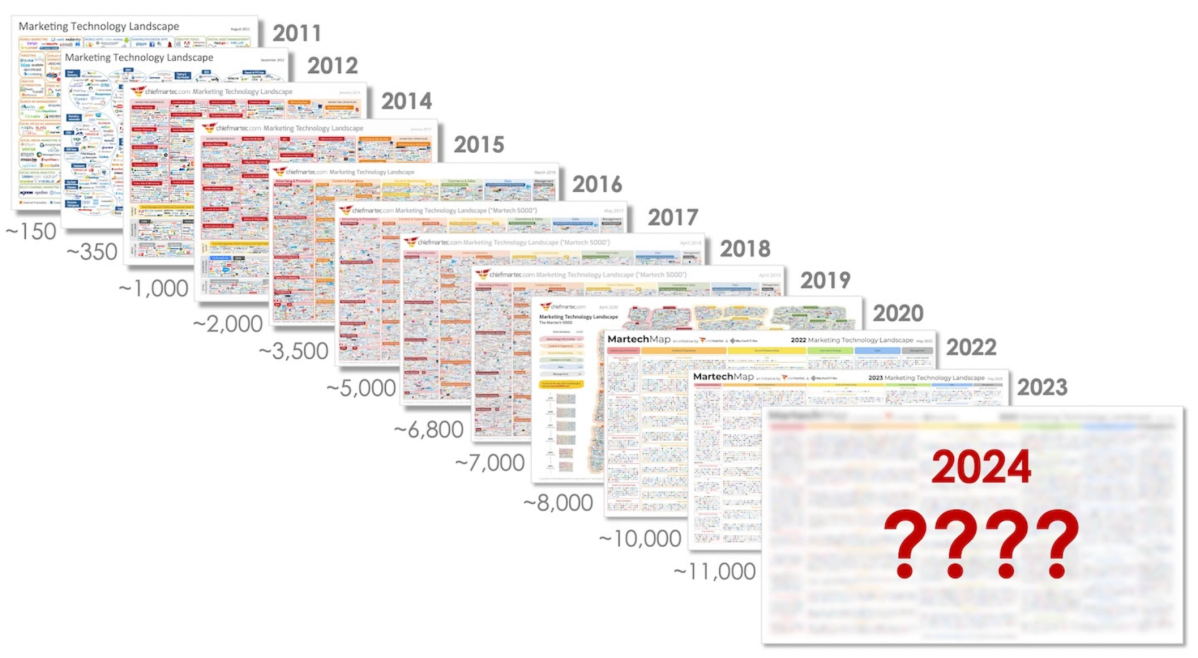

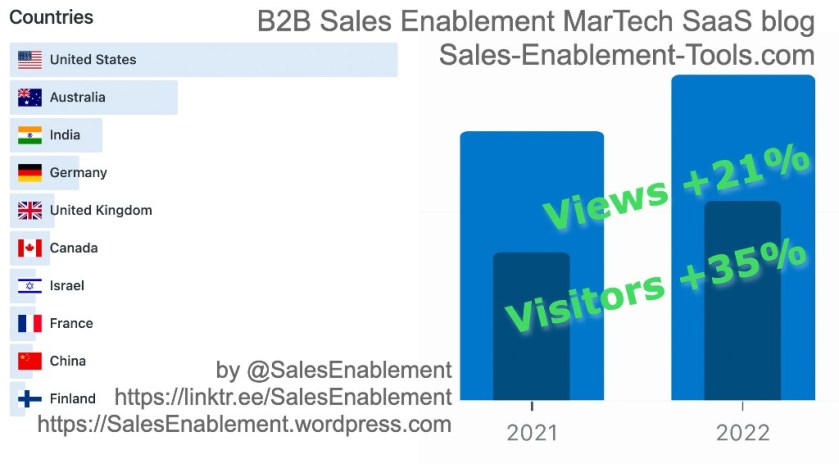


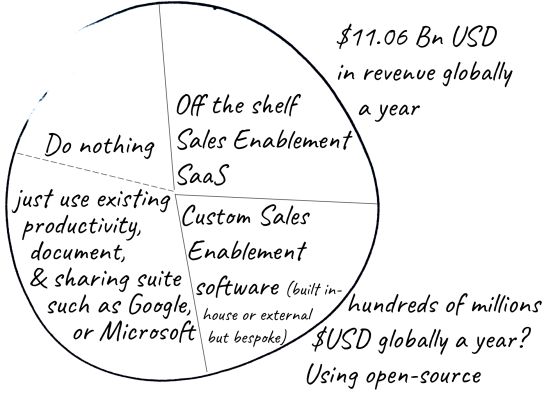

 Paul Krajewski LinkedIn twitter: @SalesEnablement
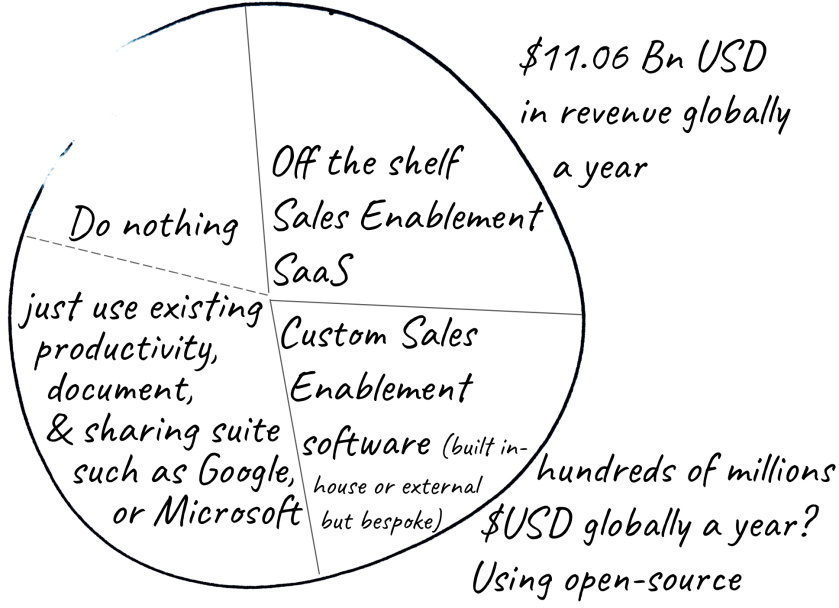


































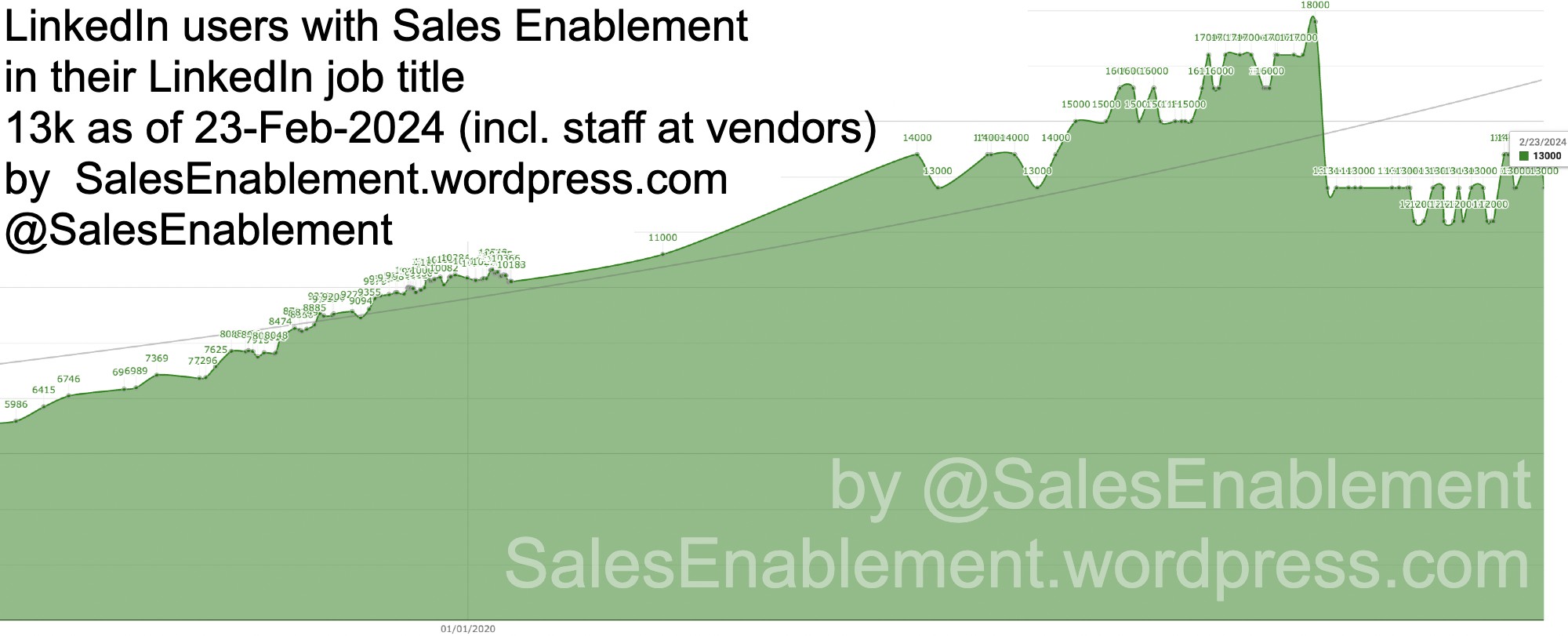
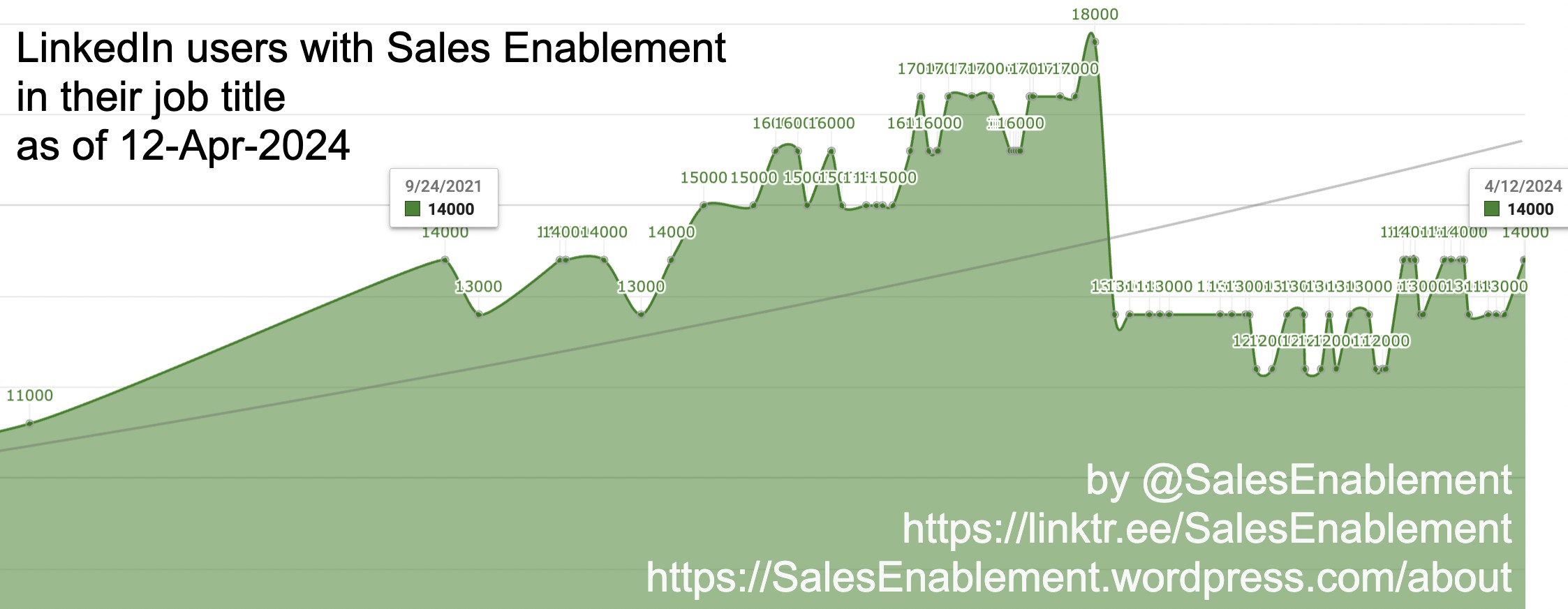
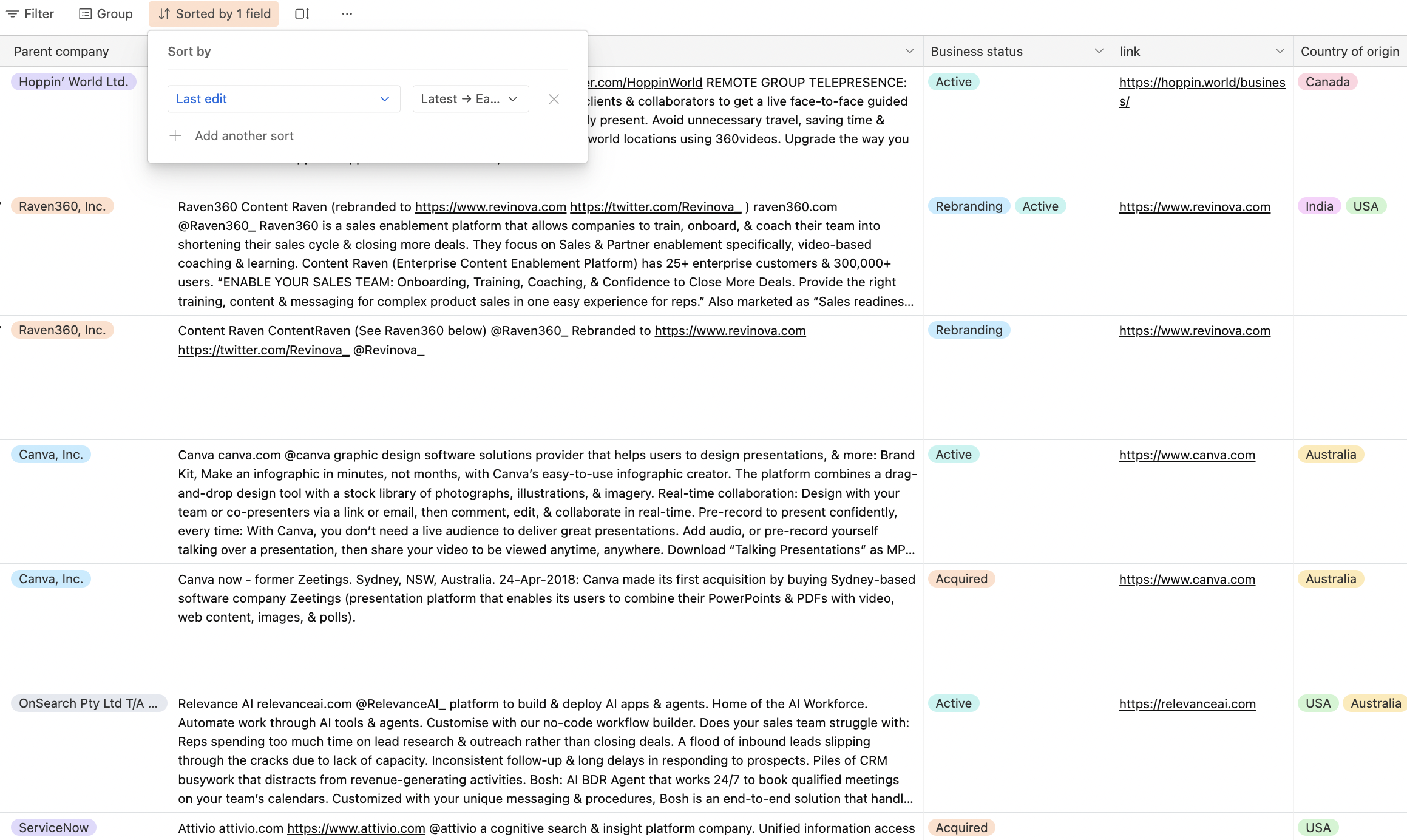
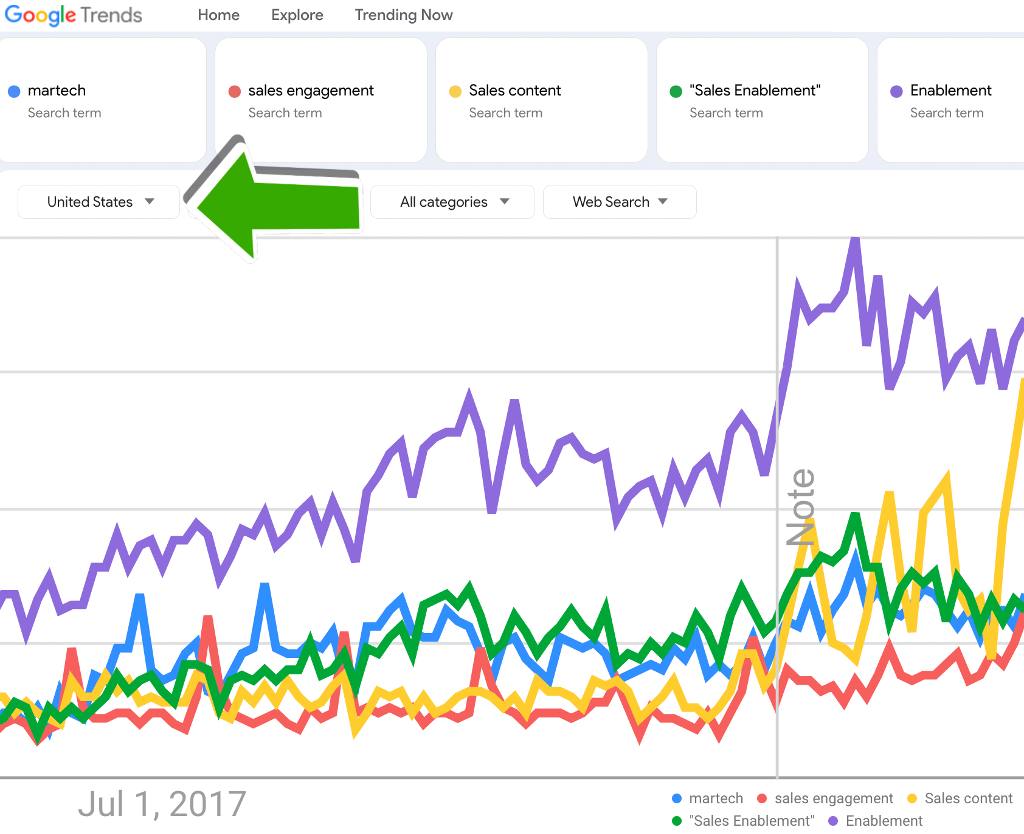


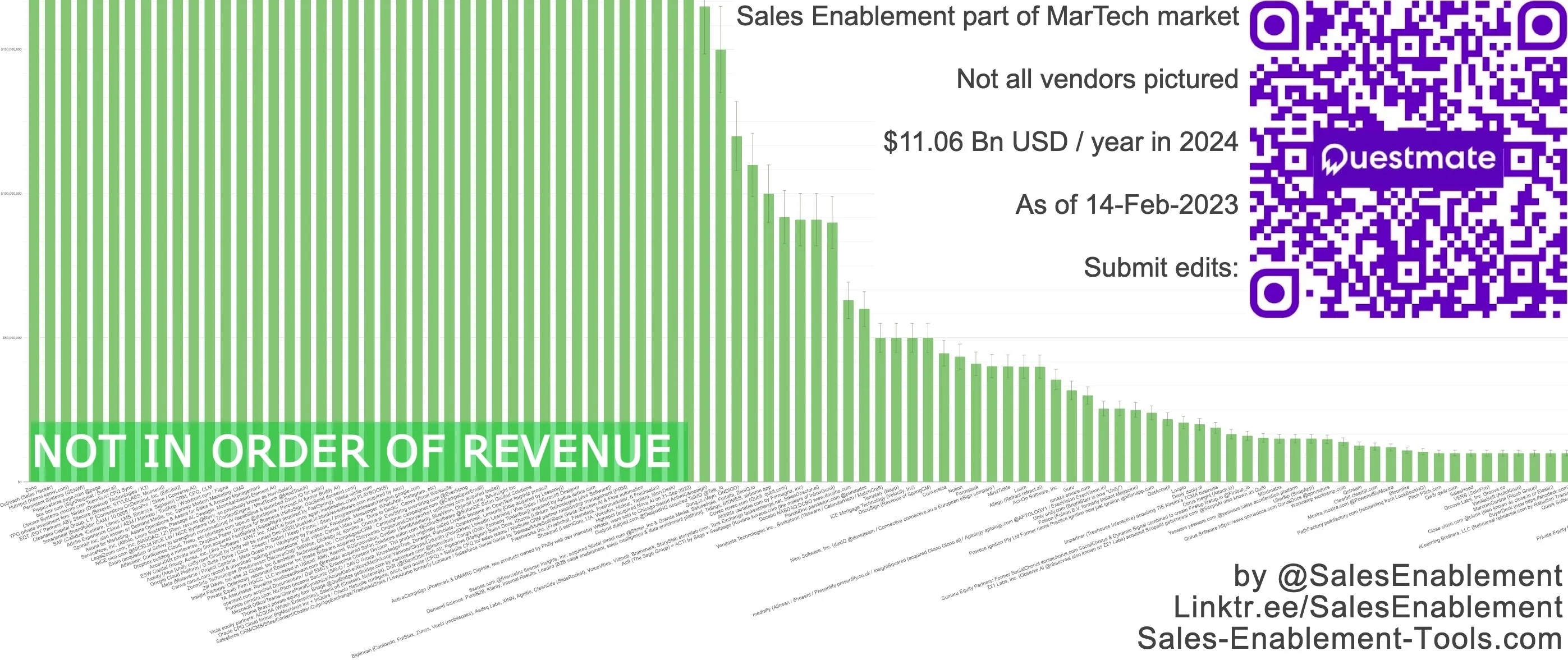

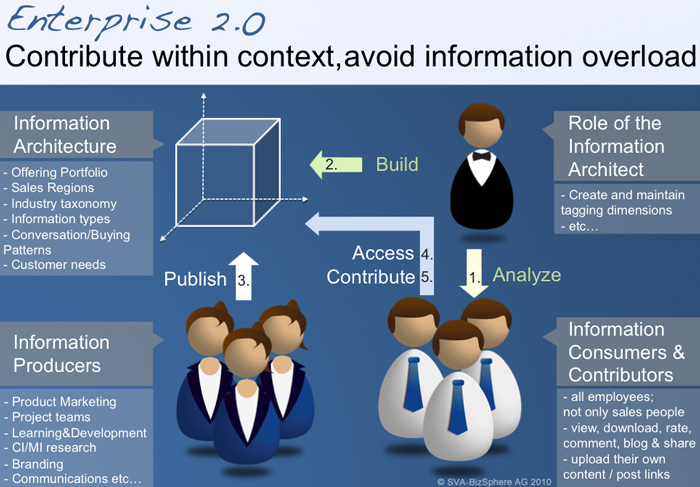

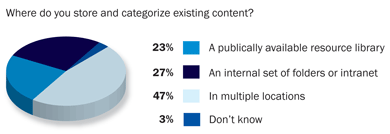



 B2B Sales Enablement and Sales Tech SaaS